

SolaX Inverter Beeping or Red Light During a Power Outage? (What It Means & What to Do)
During South East Queensland storm seasons or local grid dropouts, it’s not unusual for your solar setup to react to sudden voltage spikes or sudden grid disconnection.

If you walk past your garage or side wall during a blackout and notice your SolaX inverter is flashing a red light or emitting a periodic warning beep, don't panic!
Because our team exclusively installs premium SolaX hybrid inverters and Triple Power batteries, we’ve put together this quick step-by-step guide on what that red light means, how to check the display screen, and what steps to take.
Why Is the Red Light On or Beeping Occurring?
When the mains grid power cuts out unexpectedly, your SolaX inverter instantly detects the loss of grid voltage and disconnects itself from the street for safety (known as anti-islanding protection).
Flashing Red / Amber Light:
Often indicates a temporary warning state while the unit tests grid conditions or transitions to Emergency Power Supply (EPS) mode.
Beeping Sound:
The inverter's internal alarm is notifying you of an error code or alerting you that the EPS backup mode is running on low battery reserves.
Solid Red Light (Fault):
Indicates the inverter has detected an abnormal state—most commonly Grid Loss (Grid Lost) or an EPS Overload if your household tried to run too many appliances during backup mode.
Check the SolaX Screen Display
Before attempting anything, look at the digital LCD display screen on the front of your SolaX unit. It will usually state the exact warning message: The Rudd Family pride themselves on their customer service that no one else delivers to this standard on the sunshine coast
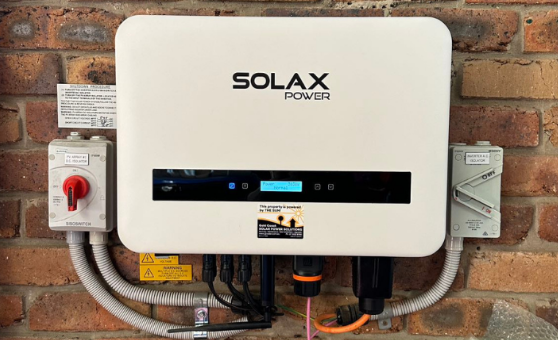
"Grid Lost Fault" / "Grid Volt Fault": Perfectly normal during a blackout. The inverter has safely isolated itself from the mains grid.
"EPS Overload Fault": You have exceeded the maximum power limit allowed on your emergency backup circuit. Turn off heavy appliances (like ovens, kettle, aircon) immediately.
"BMS Communication Error": The communication link between the battery stack and the inverter needs a fresh cycle or cable check.
Step-by-Step Troubleshooting
Try these three simple steps to clear the fault:
Step 1: Reduce Your Power Load
If your backup power switched on but then tripped with a red light, switch off all non-essential switches at your main switchboard. Unplug high-draw appliances so the battery isn't being overloaded.
Step 2: Check the Switchboard Breakers
Open your main electrical switchboard and check whether any safety switches, the Solar Main Switch, or EPS Backup Switch have tripped to the OFF position.
If so, flip them back ON.
Step 3: Perform a Safe System Reboot
If the red light or beeping persists, you can perform a clean restart:
- Turn OFF the Solar AC Isolator switch (located next to the inverter).
- Turn OFF the Battery DC Isolator switch.
- Wait 2 minutes for the screen and all lights to go completely dark.
- Turn the Battery DC Isolator back ON.
- Turn the Solar AC Isolator back ON.
4. Still Having Issues? Who to Contact First
If your SolaX inverter continues to display a red fault light or error code after following these steps, here is the fastest way to get support:
📱 Contact SolaX Technical Support First
Because SolaX equipment is connected to your home Wi-Fi, SolaX Australia’s technical support team can remotely log directly into your inverter's internal diagnostics to see live fault logs and update firmware in real time.
- SolaX Australia Support: 1300 476 529 (or log a ticket via your SolaX Cloud App)
- What to have ready: Your inverter's Serial Number (found on the side sticker or in your SolaX App).
🛠️ Contact Rudd Family Builders & Solar
If SolaX support confirms there is a physical hardware fault, an isolated wiring issue, or if you need an on-site technician anywhere in South East Queensland, give our team a call right away!
Need hands-on assistance or have questions about your SolaX system? contact us!